












What Is HDBaseT and How Does It Work? A Simple Guide
Have you ever tried to connect a computer in one room to a TV in another room, only to find your cable is way too short? You're not alone. Long cable runs are one of the most common headaches in home theaters, offices, classrooms, and conference rooms.
The good news is that there's a simple fix, and it's called HDBaseT. In this guide, we'll explain what HDBaseT is in plain words, the everyday problems it solves, and which OREI extender fits your setup.
What Is HDBaseT?
HDBaseT is a technology that sends video, audio, and other signals over a regular network cable. That's the same kind of CAT5e or CAT6 cable many people already use for internet.
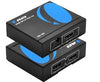
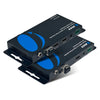
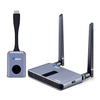
Here's the easiest way to picture it. An HDBaseT extender comes as a pair: a transmitter and a receiver. The transmitter sits next to your source, like a computer, laptop, or streaming device. It turns the video signal into an HDBaseT signal and sends it down the network cable.
At the other end, the receiver sits next to your TV or monitor and turns the signal back into a picture. With OREI's HDBaseT extenders, this works at distances of up to 100 meters, or about 330 feet.
And it's not just video. Depending on the model, that same single cable can also carry USB, remote control (IR) signals, RS-232 commands, and even power.

Common Problems HDBaseT Solves
Problem 1: Your cable just won't reach. Regular HDMI and DisplayPort cables are made for short runs. When your screen is across a big room, down a hallway, or on another floor, you need something that can go much farther.
Problem 2: Too many cables. A typical setup can need a video cable, a USB cable, a control cable, and a power cord at each end. That's messy and hard to run through walls and ceilings.
Problem 3: Your computer is in one place, but you work in another. Many people keep their PC in a rack, a closet, or another room. They still need a keyboard and mouse right next to the screen.
Problem 4: No power outlet where you need it. Sometimes there's simply no outlet behind the TV or near the wall.
HDBaseT tackles all of these with one network cable. Now let's look at which OREI extender fits your setup.
The Right OREI HDBaseT Extender for Your Setup
For HDMI setups: OREI UHD-EXB330U2-K
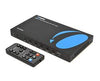
If your source uses HDMI, the UHD-EXB330U2-K 4K HDBaseT HDMI Extender (Loop, KVM) is a great place to start. It sends 4K@60Hz (4:4:4) video up to 330ft over a single CAT5e/6 cable. It also supports HDR10, HDR10+, Dolby Vision, and HLG.
Thanks to USB 2.0 KVM control, you can plug a keyboard and mouse into the receiver and control a computer that's far away. The transmitter has an HDMI loop out, so you can keep a local screen next to the source too.
You also get audio extraction through a 3.5mm jack on the receiver, CEC pass-through, and bi-directional Power over Cable (PoC). That means one power adapter can run both units.
Great for: video conferencing, digital signage, control rooms, multimedia broadcasting, and work-from-home setups.
For DisplayPort setups: OREI DP-EX330UR-K
Many computers and workstations use DisplayPort instead of HDMI. The DP-EX330UR-K 4K@60Hz HDBaseT DisplayPort Extender is DisplayPort 1.4a compliant. It sends DisplayPort, USB 2.0, IR, and RS-232 signals up to 330ft over one CAT5e/6 cable.
The receiver has four USB 2.0 ports for a keyboard, mouse, USB camera, or USB drive. Bi-directional IR lets you use a remote control from either end, and RS-232 pass-through supports two-way command transmission.
It also offers EDID TV Copy and STD modes, full HDR pass-through, audio de-embedding, and bi-directional PoC, so either unit can power the other.
Great for: video conferencing systems, multimedia signal distribution, and professional AV installations.
For a clean wall plate setup: OREI UHD-WPE330UR-K
Want a neat, built-in look? The UHD-WPE330UR-K 4K HDBaseT HDMI & USB-C Extender with Wall Plate puts the transmitter right in the wall. It has one HDMI input and one USB-C input, with automatic, manual, and priority switching between them.
The USB-C port supports DisplayPort Alt Mode, USB 2.0 data, and up to 60W laptop charging when the transmitter is powered locally. Video and USB travel up to 328ft over a single CAT6/6A cable.
The receiver has four USB 2.0 device ports, balanced and unbalanced audio de-embedding, and bi-directional IR and RS-232 pass-through. It can even turn your display on or off through CEC, RS-232, or IR.
Great for: residential and commercial AV installations, like meeting rooms where people connect their own laptops.
Which One Is Right for You?
- Your source uses HDMI and you want simple long-distance video with keyboard and mouse control: choose the UHD-EXB330U2-K.
- Your source uses DisplayPort and you need more USB ports, IR, and RS-232 control: choose the DP-EX330UR-K.
- You want a wall plate that accepts both HDMI and USB-C laptops, with charging: choose the UHD-WPE330UR-K.
Final Thoughts
HDBaseT takes the stress out of long cable runs. One network cable can carry your video, USB, control signals, and even power, up to 330 feet away.
Not sure which extender fits your project? OREI's technical support team is happy to help. Just fill out the form on our Contact Us page, and our customer support team will get back to you as soon as possible.


