














The meeting is ready to begin. The presentation isn't.
Someone is still feeding an HDMI cable across the conference table, moving chairs out of the way, or realizing the cable isn't quite long enough to reach the display. It happens often enough that many organizations have started rethinking how presentation spaces are set up.
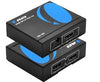
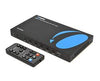
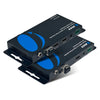
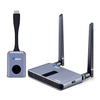
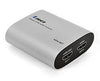
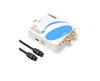
Wireless hdmi transmitter and receiver offer a simpler alternative. Instead of running long cables across the room, presenters can share content wirelessly while keeping the space cleaner and easier to use. OREI Wireless HDMI solutions are designed to bring that plug-and-play experience to meeting rooms, classrooms, training spaces, and other presentation environments.
What Is Wireless HDMI Technology?
Wireless HDMI does exactly what the name suggests: it sends high-definition audio and video from one device to another without a physical HDMI cable connecting them.
A transmitter connects to a laptop, desktop computer, media player, presentation device, or conference room PC. A receiver connects to the projector, television, or display. Once paired, the system transmits the HDMI signal wirelessly.
How Wireless HDMI Works During Presentations
Using a wireless HDMI extender usually takes only a few steps.
Connect the wireless hdmi transmitter to the presentation source and the receiver to the display. After the two units pair automatically, presentations can begin without long HDMI cable runs.
Most systems are plug-and-play and require little or no network configuration.
Key Benefits of Wireless HDMI for Meeting Rooms and Presentation Spaces
Presentation spaces change over time. Furniture moves, displays get upgraded, and different groups use the room throughout the day. Wireless HDMI makes those changes easier to accommodate.
Eliminating long HDMI cable runs creates cleaner rooms, reduces trip hazards, and speeds up meeting setup. Presenters can move freely without being tethered to a display connection, while organizations avoid much of the cable routing needed for room updates.
Updating an existing conference room also becomes less disruptive because there's less infrastructure to install or relocate as room layouts evolve.
OREI Wireless HDMI Extender solutions are designed for these flexible presentation environments, helping businesses modernize meeting spaces without extensive infrastructure changes.
Common Presentation Environments That Benefit from Wireless HDMI
The value of wireless presentation depends on how the room is used.
Conference rooms benefit when employees, clients, and visitors regularly connect different laptops during meetings. Training centers can transition between instructors without reconnecting long cables before every session.
Classrooms make it easier to switch between lesson materials and presentation devices, while houses of worship can simplify presentations and announcements without adding visible cabling across the stage. Event venues also benefit because temporary wireless presentation system setups often don't justify permanent cable installations.
Choosing the Right Wireless HDMI Extender for Your Setup
Room size matters just as much as resolution.
Smaller meeting rooms typically need only short-range wireless transmission for nearby displays. Medium-sized conference rooms often benefit from systems designed to maintain reliable performance across greater distances while supporting projectors or larger displays.
Training rooms, lecture halls, and auditoriums usually require longer-range wireless solutions that provide presenters with more flexibility as they move around the space.
Display resolution also plays a role. A 1080p wireless HDMI extender is often more than enough for presentations, spreadsheets, and video conferencing. A 4K model becomes a better fit when presentations include detailed product demonstrations, engineering drawings, architectural plans, or other high-resolution visual content.
OREI offers Wireless HDMI Extender options designed for different room sizes, transmission distances, and presentation requirements, making it easier to match the system to the environment rather than settling for a one-size-fits-all solution.
Wireless HDMI vs Traditional HDMI Cables
| Feature | HDMI Cable | Wireless HDMI |
|---|---|---|
| Installation | Requires cable routing | Plug-and-play |
| Mobility | Limited | Greater flexibility |
| Room Appearance | Visible cables | Clean setup |
| Setup Time | Moderate | Fast |
| Scalability | Cable-dependent | Easier repositioning |
| Best For | Permanent installations | Dynamic presentation spaces |
Both approaches have their place. Traditional HDMI cables remain an excellent choice for permanent installations where equipment rarely moves, while Wireless HDMI is often the better fit for spaces that need flexibility.
Important Considerations Before Going Wireless
Removing cables is only part of the decision. Consider transmission distance, display resolution, possible interference, line-of-sight requirements, and future room expansion before choosing a system.
It's also worth thinking beyond your current requirements. Additional displays, different presenters, or future room changes may influence which wireless HDMI extender makes the most sense.
Real-World Example: Creating a Cable-Free Conference Room
A conference room that once relied on a long HDMI cable across the table switched to a wireless HDMI extender instead.
Presenters simply connected the transmitter to their laptop and started presenting within minutes. The room immediately felt less cluttered, setup became faster, and speakers could move naturally without worrying about cable length. Just as importantly, the organization avoided running new cables through walls or under flooring to modernize the space.
Simplifying Presentations with Wireless HDMI
Wireless HDMI gives organizations a practical way to reduce cable clutter while making presentations easier to deliver.
Cleaner meeting spaces, faster setup, greater presenter mobility, and straightforward installation all contribute to a better experience for employees, educators, and guests. For businesses looking to modernize presentation environments without extensive cabling, OREI wireless hdmi kit solutions provide a flexible and reliable alternative to traditional wired connections.